Replay · UTC
UTC candle replay
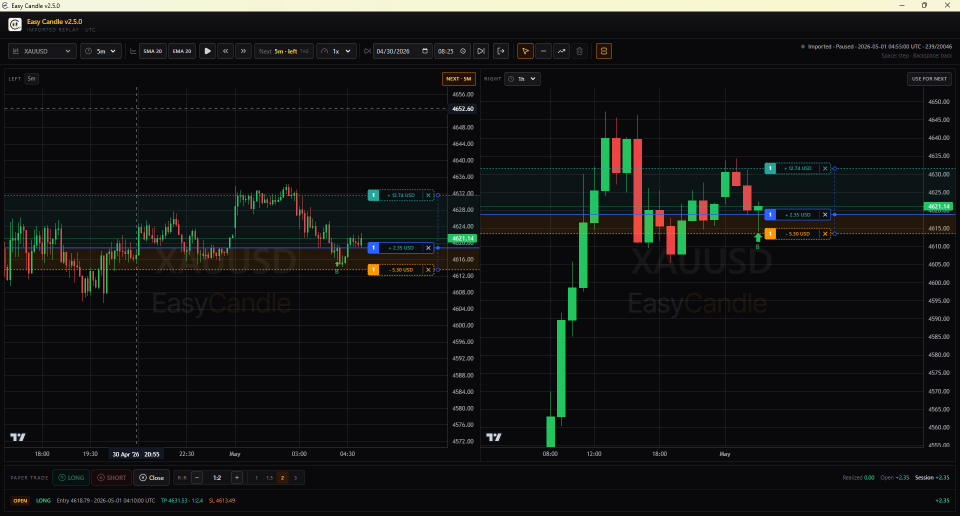
Jump to a UTC start, or randomize a 100–1000 bar session from the last year. Play, pause, step, and rewind — including trade state.
Replay · UTC
Step through real Binance history, MetaTrader 1m CSV, or a live MT5 Expert Advisor feed in UTC. Paper trade with stop loss and take profit — a free desktop app for Windows, macOS, and Linux.

How it works
Load a Binance USDT pair, import a MetaTrader 4/5 1-minute CSV, or stream live M1 from MT5 with the Easy Candle EA (gold, forex, custom symbols).
Start at a UTC time or run a random drill. Play, pause, step forward and back at 0.5×–4×.
Open long or short, drag SL/TP, then exit to a session report and CSV of closed trades.
Features
Replay · UTC
Jump to a UTC start, or randomize a 100–1000 bar session from the last year. Play, pause, step, and rewind — including trade state.
Paper trade
Enter at the current close. Drag stop loss and take profit; first placement seeds the other from your R:R guide. Session PnL and CSV export on exit.
Split chart
Side-by-side panes with independent timeframes. One driver pane advances the playhead; Tab switches which chart leads.
Imported
Drop in MT4/MT5 1-minute exports, or attach the Easy Candle EA to stream live M1 from MT5. Builds 5m · 15m · 1h · 4h · 1d.
Analyze
Horizontal and trend lines on the chart. Toggle SMA 20 and EMA 20 from the toolbar while you replay.
Open source
No subscription. Install from GitHub Releases; the app checks for updates on startup. Also on the Microsoft Store.
MetaTrader 5
The Easy Candle Expert Advisor attaches to an M1 chart in MetaTrader 5 and sends
1-minute OHLC to the desktop app over a local WebSocket
(ws://127.0.0.1:17321). Preview the feed, then confirm import — nothing
is saved until you do. After that, live bars keep the dataset up to date.
Compiled EA for MT5 · latest release
Copy EasyCandleBridge.ex5 into MQL5/Experts/ (File → Open
Data Folder in MT5), then restart or refresh Navigator.
Enable algorithmic trading, AutoTrading, and WebRequest for
http://127.0.0.1. Start Easy Candle first so it is already listening.
Attach on the symbol’s M1 chart (other periods are rejected). When the preview has at least 14,400 bars (~10 days), confirm Import from MetaTrader.
Download
Latest installers ship on GitHub Releases. Windows users can also install from the Microsoft Store.

Easy Candle is paper trading only. It does not place live orders.